

(Registered version only)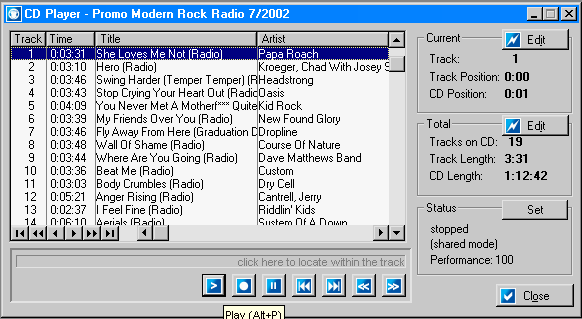
The CD player is used to play CDs in your computer�s CD-ROM drive (see the configuration section for instructions on drive selection).
If the CD is in your database, the information will automatically be displayed. If not, you will be prompted to add it.
Buttons along the bottom of the song list are:
- Play
- Stop
- Pause
- Previous track
- Next track
- Rewind 10 seconds
- Fast forward 10 seconds
There is a bar under the song list labeled �click here to locate within track�. This progress bar shows the location within the current track being played. To change to a different point within the song, click on the bar.
Edit buttons along the right-side of the song list allow you to change the current track or album.
The �Set� button on the status area allows you to fine tune the CD Player responsiveness. This is usually unnecessary.